
Get started
Quickstart
This page takes one user from your Edit video button to a saved video, with the reference for each API call where you make it. The examples are a real estate site, acme-realty.example, where an agent edits a listing’s walkthrough.
You need a Rendley account on a paid plan and a server that can keep a key secret. There is no SDK to install.
1. Get a Connect key
Open Settings → Connect, click Create key, name it and copy it. The key is shown once. Keep it on your server.
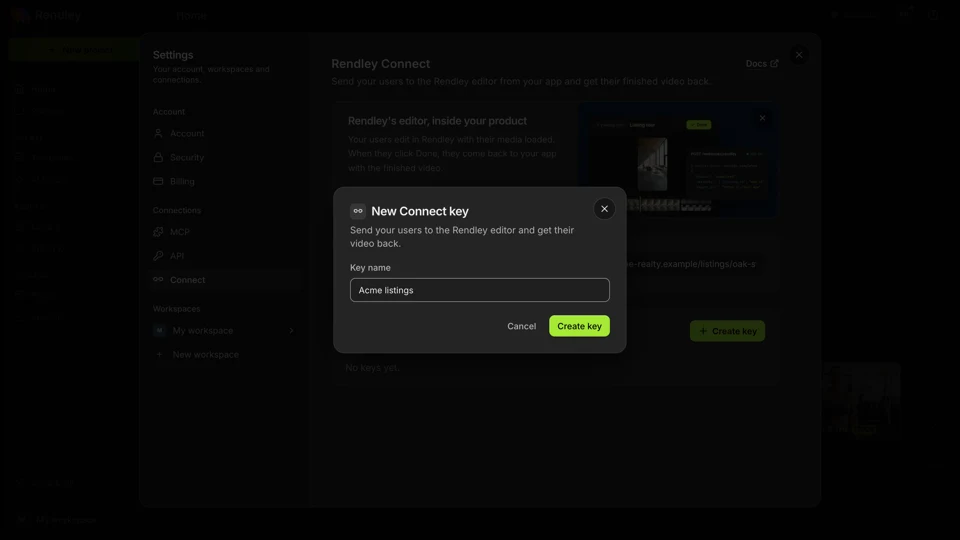
RENDLEY_CONNECT_KEY=rk_connect_...Connect keys start with rk_connect_ and only work with Connect. Keys and errors covers key types and revoking.
Both calls below use the same two helpers. They return data from the response and throw with the API’s error code.
const RENDLEY = "https://api.rendley.com/v1/connect/sessions";
const headers = {
  "Authorization": "Bearer " + process.env.RENDLEY_CONNECT_KEY,
  "Content-Type": "application/json",
};

async function call(url, init) {
  const response = await fetch(url, { headers, ...init });
  const json = await response.json();
  if (!response.ok) {
    throw Object.assign(new Error(json.error.message), { code: json.error.code });
  }
  return json.data;
}

export const createSession = (body) => call(RENDLEY, { method: "POST", body: JSON.stringify(body) });
export const getSession = (id) => call(RENDLEY + "/" + id);
import os
import requests
RENDLEY = "https://api.rendley.com/v1/connect/sessions"
HEADERS = {"Authorization": f"Bearer {os.environ['RENDLEY_CONNECT_KEY']}"}
class RendleyError(Exception):
def __init__(self, code, message):
super().__init__(message)
self.code = code
def _data(response):
if not response.ok:
error = response.json()["error"]
raise RendleyError(error["code"], error["message"])
return response.json()["data"]
def create_session(body):
return _data(requests.post(RENDLEY, headers=HEADERS, json=body))
def get_session(session_id):
return _data(requests.get(f"{RENDLEY}/{session_id}", headers=HEADERS))#2. Create a session
https://api.rendley.com/v1/connect/sessionsCreate the session when a signed-in user clicks Edit video, not ahead of time. Send the video they want to edit and the page to bring them back to. Save the id with your user, then redirect them to url.
The link must be opened before expires_at, 24 hours from now, and each visit moves that to 24 hours after the visit. The first Rendley account that opens it owns the session. Until then anyone with the link can open it, which is why you create it on the click and redirect at once.
Don't have one? Create a Connect key
assetsoptionalMedia to load into the project, up to 20, placed on the timeline in this order. Leave it out for an empty project.
Direct link to the file, http(s), up to 2,048 characters. The user's browser loads it, so your host must allow CORS. See Prepare your assets.
Where the user lands after Done or Back to. http(s), up to 2,048 characters. Required unless you set a default return URL in Connect settings.
Your own data, returned on every read. String values, up to 20 keys, keys up to 40 characters, values up to 500.
An earlier session to reopen, with the user's edits. See Continue editing.
const res = await fetch("https://api.rendley.com/v1/connect/sessions", {
  method: "POST",
  headers: { Authorization: "Bearer YOUR_CONNECT_KEY", "Content-Type": "application/json" },
  body: JSON.stringify({
    "assets": [
      {
        "url": "https://cdn.acme-realty.example/villa-tour.mp4"
      }
    ],
    "return_url": "https://acme-realty.example/listings/villa-marina",
    "metadata": {
      "listing_id": "villa-marina"
    }
  }),
});
const { data } = await res.json();
curl -X POST "https://api.rendley.com/v1/connect/sessions" \
-H "Authorization: Bearer YOUR_CONNECT_KEY" \
-H "Content-Type: application/json" \
-d '{
"assets": [
{
"url": "https://cdn.acme-realty.example/villa-tour.mp4"
}
],
"return_url": "https://acme-realty.example/listings/villa-marina",
"metadata": {
"listing_id": "villa-marina"
}
}'import requests
res = requests.post(
"https://api.rendley.com/v1/connect/sessions",
headers={"Authorization": "Bearer YOUR_CONNECT_KEY"},
json={
"assets": [
{
"url": "https://cdn.acme-realty.example/villa-tour.mp4"
}
],
"return_url": "https://acme-realty.example/listings/villa-marina",
"metadata": {
"listing_id": "villa-marina"
}
},
)
data = res.json()["data"]$ch = curl_init("https://api.rendley.com/v1/connect/sessions");
curl_setopt($ch, CURLOPT_RETURNTRANSFER, true);
curl_setopt($ch, CURLOPT_CUSTOMREQUEST, "POST");
curl_setopt($ch, CURLOPT_HTTPHEADER, ["Authorization: Bearer YOUR_CONNECT_KEY", "Content-Type: application/json"]);
curl_setopt($ch, CURLOPT_POSTFIELDS, json_encode(["assets" => [["url" => "https://cdn.acme-realty.example/villa-tour.mp4"]], "return_url" => "https://acme-realty.example/listings/villa-marina", "metadata" => ["listing_id" => "villa-marina"]]));
$response = curl_exec($ch);
curl_close($ch);
$data = json_decode($response, true)["data"];package main
import (
"fmt"
"io"
"net/http"
"bytes"
)
func main() {
body := bytes.NewBufferString(`{
"assets": [
{
"url": "https://cdn.acme-realty.example/villa-tour.mp4"
}
],
"return_url": "https://acme-realty.example/listings/villa-marina",
"metadata": {
"listing_id": "villa-marina"
}
}`)
req, _ := http.NewRequest("POST", "https://api.rendley.com/v1/connect/sessions", body)
req.Header.Set("Authorization", "Bearer YOUR_CONNECT_KEY")
req.Header.Set("Content-Type", "application/json")
res, _ := http.DefaultClient.Do(req)
defer res.Body.Close()
b, _ := io.ReadAll(res.Body)
fmt.Println(string(b))
}require "net/http"
require "json"
uri = URI("https://api.rendley.com/v1/connect/sessions")
req = Net::HTTP::Post.new(uri)
req["Authorization"] = "Bearer YOUR_CONNECT_KEY"
req["Content-Type"] = "application/json"
req.body = { assets: [{ url: "https://cdn.acme-realty.example/villa-tour.mp4" }], return_url: "https://acme-realty.example/listings/villa-marina", metadata: { listing_id: "villa-marina" } }.to_json
res = Net::HTTP.start(uri.hostname, uri.port, use_ssl: true) { |http| http.request(req) }
data = JSON.parse(res.body)["data"]Response 200
{
  "data": {
    "id": "98db7a48-b4ec-4219-8f90-b1db4ae60cf5",
    "url": "https://app.rendley.com/editor/session/98db7a48-b4ec-4219-8f90-b1db4ae60cf5",
    "status": "created",
    "metadata": {
      "listing_id": "villa-marina"
    },
    "expires_at": "2026-11-14T11:51:10Z"
  }
}
3. Redirect the user
Save the session, then send the browser to session.url.
app.post("/listings/:id/edit", requireLogin, async (req, res) => {
  const listing = await db.listings.findOne({ id: req.params.id, userId: req.user.id });
  const session = await createSession({
    assets: [{ url: listing.videoUrl }],
    return_url: "https://acme-realty.example/listings/" + listing.id,
    metadata: { listing_id: listing.id },
  });
  await db.videoSessions.insert({
    id: session.id,
    userId: req.user.id,
    listingId: listing.id,
    status: "created",
  });
  res.redirect(303, session.url);
});@app.post("/listings/<listing_id>/edit")
@login_required
def edit_listing(listing_id):
listing = db.listings.find_one(id=listing_id, user_id=current_user.id)
session = create_session({
"assets": [{"url": listing.video_url}],
"return_url": f"https://acme-realty.example/listings/{listing.id}",
"metadata": {"listing_id": listing.id},
})
db.video_sessions.insert(
id=session["id"], user_id=current_user.id, listing_id=listing.id, status="created",
)
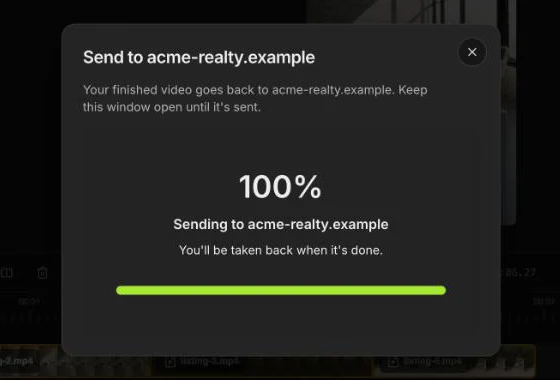
return redirect(session["url"], code=303)The user edits, clicks Done, then Send to acme-realty.example. The video renders in their browser and uploads, so the tab has to stay open until it’s sent.
4. Handle the return
The browser lands on your return URL with two parameters added. Rendley replaces any parameters you already had with the same names, and puts them before a #fragment.
https://acme-realty.example/listings/villa-marina?session_id=98db7a48-b4ec-4219-8f90-b1db4ae60cf5&status=completedstatus | Meaning |
|---|---|
completed | The user sent the video. |
cancelled | The user clicked Back to. Nothing was sent, and the same link reopens their project. |
Anyone can type these into a URL. Only accept a session_id you saved for the signed-in user, and take the real status from the API.
#Read the session
https://api.rendley.com/v1/connect/sessions/{id}statusstringcreated until the video has uploaded, then completed. Back to leaves it at created.
export_urlstringDownload link for the finished video, only when completed. New on every read, valid for 3 hours.
metadataobjectWhat you sent, or {}.
expires_atstringWhen the link stops opening, RFC 3339.
Returns 404 NOT_FOUND for an id that isn’t one of your sessions.
Don't have one? Create a Connect key
const res = await fetch("https://api.rendley.com/v1/connect/sessions/{id}", {
  headers: { Authorization: "Bearer YOUR_CONNECT_KEY" },
});
const { data } = await res.json();
curl "https://api.rendley.com/v1/connect/sessions/{id}" \
-H "Authorization: Bearer YOUR_CONNECT_KEY"import requests
res = requests.get(
"https://api.rendley.com/v1/connect/sessions/{id}",
headers={"Authorization": "Bearer YOUR_CONNECT_KEY"},
)
data = res.json()["data"]$ch = curl_init("https://api.rendley.com/v1/connect/sessions/{id}");
curl_setopt($ch, CURLOPT_RETURNTRANSFER, true);
curl_setopt($ch, CURLOPT_HTTPHEADER, ["Authorization: Bearer YOUR_CONNECT_KEY"]);
$response = curl_exec($ch);
curl_close($ch);
$data = json_decode($response, true)["data"];package main
import (
"fmt"
"io"
"net/http"
)
func main() {
req, _ := http.NewRequest("GET", "https://api.rendley.com/v1/connect/sessions/{id}", nil)
req.Header.Set("Authorization", "Bearer YOUR_CONNECT_KEY")
res, _ := http.DefaultClient.Do(req)
defer res.Body.Close()
b, _ := io.ReadAll(res.Body)
fmt.Println(string(b))
}require "net/http"
require "json"
uri = URI("https://api.rendley.com/v1/connect/sessions/{id}")
req = Net::HTTP::Get.new(uri)
req["Authorization"] = "Bearer YOUR_CONNECT_KEY"
res = Net::HTTP.start(uri.hostname, uri.port, use_ssl: true) { |http| http.request(req) }
data = JSON.parse(res.body)["data"]Response 200
{
  "data": {
    "id": "98db7a48-b4ec-4219-8f90-b1db4ae60cf5",
    "url": "https://app.rendley.com/editor/session/98db7a48-b4ec-4219-8f90-b1db4ae60cf5",
    "status": "completed",
    "metadata": {
      "listing_id": "villa-marina"
    },
    "export_url": "https://storage.rendley.com/.../villa-marina.mp4?X-Amz-Signature=...",
    "expires_at": "2026-11-14T11:51:10Z"
  }
}
On the return page, check the session and queue the download. A conditional update makes sure a reload doesn’t queue it twice.
app.get("/listings/:id", requireLogin, async (req, res) => {
  const saved = req.query.session_id &&
    await db.videoSessions.findOne({ id: req.query.session_id, userId: req.user.id });

  if (saved && saved.status === "created") {
    try {
      const session = await getSession(saved.id);
      if (session.status === "completed") {
        // UPDATE video_sessions SET status = 'completed' WHERE id = ? AND status = 'created'
        const claimed = await db.videoSessions.update(
          { id: saved.id, status: "created" },
          { status: "completed" },
        );
        if (claimed === 1) await queue.add("save-video", { sessionId: saved.id });
      }
    } catch (err) {
      // Show the page anyway. The scheduled check below picks the session up later.
      console.error("Could not read Rendley session", saved.id, err);
    }
  }
  res.render("listing", { id: req.params.id });
});@app.get("/listings/<listing_id>")
@login_required
def listing(listing_id):
session_id = request.args.get("session_id")
saved = session_id and db.video_sessions.find_one(id=session_id, user_id=current_user.id)
if saved and saved.status == "created":
try:
if get_session(saved.id)["status"] == "completed":
# UPDATE video_sessions SET status = 'completed' WHERE id = ? AND status = 'created'
claimed = db.video_sessions.update({"id": saved.id, "status": "created"}, status="completed")
if claimed == 1:
queue.enqueue(save_video_job, saved.id)
except Exception:
# Show the page anyway. The scheduled check below picks the session up later.
app.logger.exception("Could not read Rendley session %s", saved.id)
return render_template("listing.html", listing_id=listing_id)5. Save the video
Download in a background job. The job reads the session again for a fresh export_url and copies the file to your storage.
async function saveVideoJob({ sessionId }) {
  const saved = await db.videoSessions.findOne({ id: sessionId });
  const session = await getSession(sessionId);

  if (!session.export_url) {
    // The user deleted the project in Rendley, and the video with it.
    await db.videoSessions.update({ id: sessionId }, { status: "lost" });
    return;
  }

  const file = await fetch(session.export_url);
  if (!file.ok) throw new Error("Download failed: " + file.status);
  await saveVideo(saved.listingId, file); // your storage
  await db.videoSessions.update({ id: sessionId }, { videoSavedAt: new Date() });
}
def save_video_job(session_id):
saved = db.video_sessions.find_one(id=session_id)
export_url = get_session(session_id).get("export_url")
if not export_url:
# The user deleted the project in Rendley, and the video with it.
db.video_sessions.update({"id": session_id}, status="lost")
return
with requests.get(export_url, stream=True) as file:
file.raise_for_status()
save_video(saved.listing_id, file) # your storage
db.video_sessions.update({"id": session_id}, video_saved_at=datetime.now(timezone.utc))Every way a session ends
| What happens | Session | What you do |
|---|---|---|
| The user sends the video | completed | Queue the download. |
| The user clicks Back to | created | Nothing. The same link reopens their project. |
| The user closes the tab before the upload finishes | created | Nothing was sent. They open the link again and click Done. |
| The upload fails | created | Nothing. The editor offers Send to again. |
| The tab closes after the upload, before the redirect | completed | The scheduled check below finds it. |
| The link expired | created | Create a continue session if they had opened it, a new session if not. |
| Another account opened the link first | unchanged | Create a new session for this user. |
| The user’s workspace is at its project limit | created | They delete a project or upgrade, then click your Edit button again. |
| The user deletes the project before you download | completed, no export_url | The video is gone. Ask them to edit again. |
When a link can’t open, Rendley shows the reason on the user’s Rendley home page and nothing reaches your return URL. Keep your Edit button working as the way to retry.
Check for stragglers
Some users finish but never reach your return page. Run a scheduled job over sessions that are still created on your side, for example nightly for a week.
for (const saved of await db.videoSessions.find({ status: "created" })) {
  const session = await getSession(saved.id);
  if (session.status !== "completed") continue;
  const claimed = await db.videoSessions.update({ id: saved.id, status: "created" }, { status: "completed" });
  if (claimed === 1) await queue.add("save-video", { sessionId: saved.id });
}Next, prepare your assets so the editor can load them, and see Keys and errors for every error code.