
Platform
Keys and errors
Connect keys
A Connect key authenticates your server’s requests. Your users never see it.
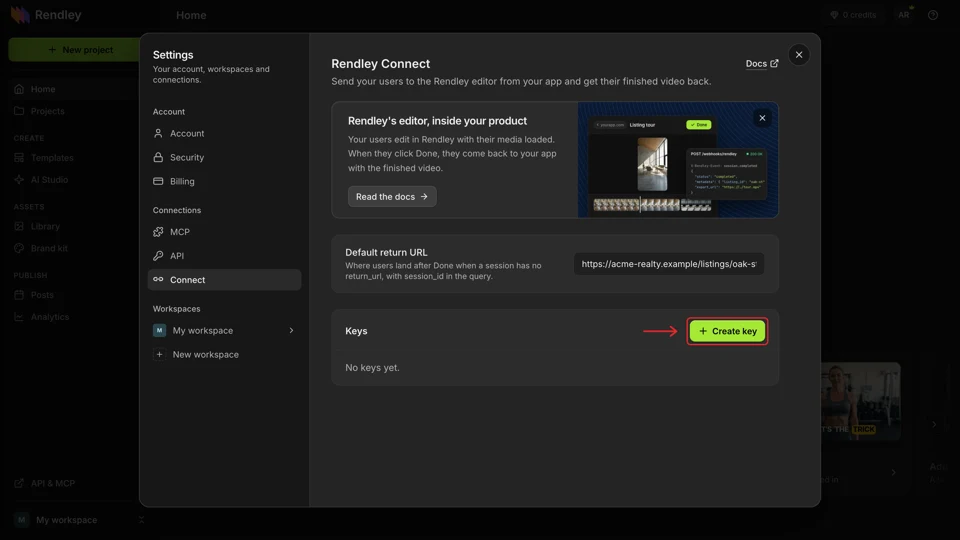
Create one in Settings → Connect with Create key, or from Settings → API → Create key by choosing Connect. The full key is shown once, so copy it to your server’s environment right away. Creating keys needs a paid Rendley plan.
Send it in the Authorization header on both endpoints.
curl https://api.rendley.com/v1/connect/sessions/YOUR_SESSION_ID \
-H "Authorization: Bearer $RENDLEY_CONNECT_KEY"| Prefix | Works with |
|---|---|
rk_connect_ | Connect sessions only. Older keys start with rk_es_ and still work. |
rk_api_ | The API and MCP, not Connect |
rk_mcp_ | MCP only |
A Connect key can create and read your sessions and nothing else, so a leaked key can’t reach your projects, media or credits. Use one key per environment, and revoke a key from Connect settings if it leaks.
Errors
Errors return a code to match on and a message for people.
{ "error": { "code": "RETURN_URL_REQUIRED", "message": "return_url is required when no default return URL is set in Settings." } }| Code | Status | Cause | Fix |
|---|---|---|---|
INVALID_REQUEST_BODY | 400 | The body isn’t valid JSON, or a field has the wrong type. | metadata values must be strings. |
VALIDATION_ERROR | 400 | A field breaks a limit, such as a bad URL or more than 20 assets. | error.fields names the field. |
RETURN_URL_REQUIRED | 400 | No return_url and no default in Connect settings. | Send one, or set a default. |
INVALID_CONTINUE_SESSION | 400 | The session to continue isn’t yours, or nobody opened it. | Create a new session. |
UNAUTHORIZED | 401 | The key is missing, revoked, or not a Connect key. | Check the header reads Bearer rk_connect_.... |
CONNECT_PLAN_REQUIRED | 403 | Creating a session from an account without a paid plan. Existing sessions still open and read. | Upgrade the account that owns the key. |
NOT_FOUND | 404 | No such session on your account. | Check the id. |
What users can see in the editor
These appear in Rendley, not in your app. When a link can’t open, the message shows on the user’s Rendley home page and nothing reaches your return URL.
| Message | Cause | Fix |
|---|---|---|
| This editing link has expired. | The link wasn’t opened within 24 hours of being created or last visited. | Create a continue session if they had opened it, a new session if not. |
| This editing link was opened by another account. | Another Rendley account opened it first. | Create a new session for this user. |
| This editing session is already finished. | The video was already sent. | Create a continue session. |
| You have reached your plan limit. | The user’s workspace is full, 10 projects on Free. | They delete a project or upgrade. Continue sessions reuse a project. |
| This file can’t be opened | The browser couldn’t load an asset. The rest still open. | Check the URL and CORS in Prepare your assets. |
| Your video is ready. It didn’t reach acme-realty.example. | The upload failed after rendering. | They click Send to again. |
| This browser can’t encode video. | The browser can’t render video. | They switch to a current Chrome, Edge or Safari. |
| The video would be larger than your browser can save. | The file would reach 2 GB. | They pick a lower resolution or quality. |
Common problems
| Problem | Fix |
|---|---|
| The editor opens without the video | The URL isn’t a direct link, or the host doesn’t allow CORS. See Prepare your assets. |
| The user never came back | Read the session. If it’s completed, the video is there. If not, nothing was sent. |
export_url returns 403 | It’s older than 3 hours. Read the session again for a new one. |
export_url is missing on a completed session | More than 7 days passed, or the user deleted the project. Ask them to send it again through a continue session. |
| Later edits never arrive | The user opened the project from Rendley directly, where there’s no Done. Send them through a continue session from your app. |